Flutter SDK
The gamifyhost_games Flutter package renders the GamifyHost game experience inside a WebView, providing a native integration for iOS and Android apps.
Installation
Section titled “Installation”Add the package to your pubspec.yaml:
dependencies: gamifyhost_games: ^1.0.0Then run:
flutter pub getPlatform Setup
Section titled “Platform Setup”The SDK uses webview_flutter under the hood. Ensure your platform is configured:
Android (android/app/build.gradle.kts):
android { defaultConfig { minSdk = 21 // WebView requires API 21+ }}iOS (ios/Runner/Info.plist):
<key>io.flutter.embedded_views_preview</key><true/>Quick Start
Section titled “Quick Start”import 'package:flutter/material.dart';import 'package:gamifyhost_games/gamifyhost_games.dart';
class GameScreen extends StatelessWidget { const GameScreen({super.key});
@override Widget build(BuildContext context) { return Scaffold( appBar: AppBar(title: const Text('Games')), body: const GamifyHostWidget( config: GamifyHostConfig( publicKey: 'pk_live_your_public_key', userId: 'user_12345', initialBalance: 5000, ), ), ); }}Screenshots
Section titled “Screenshots”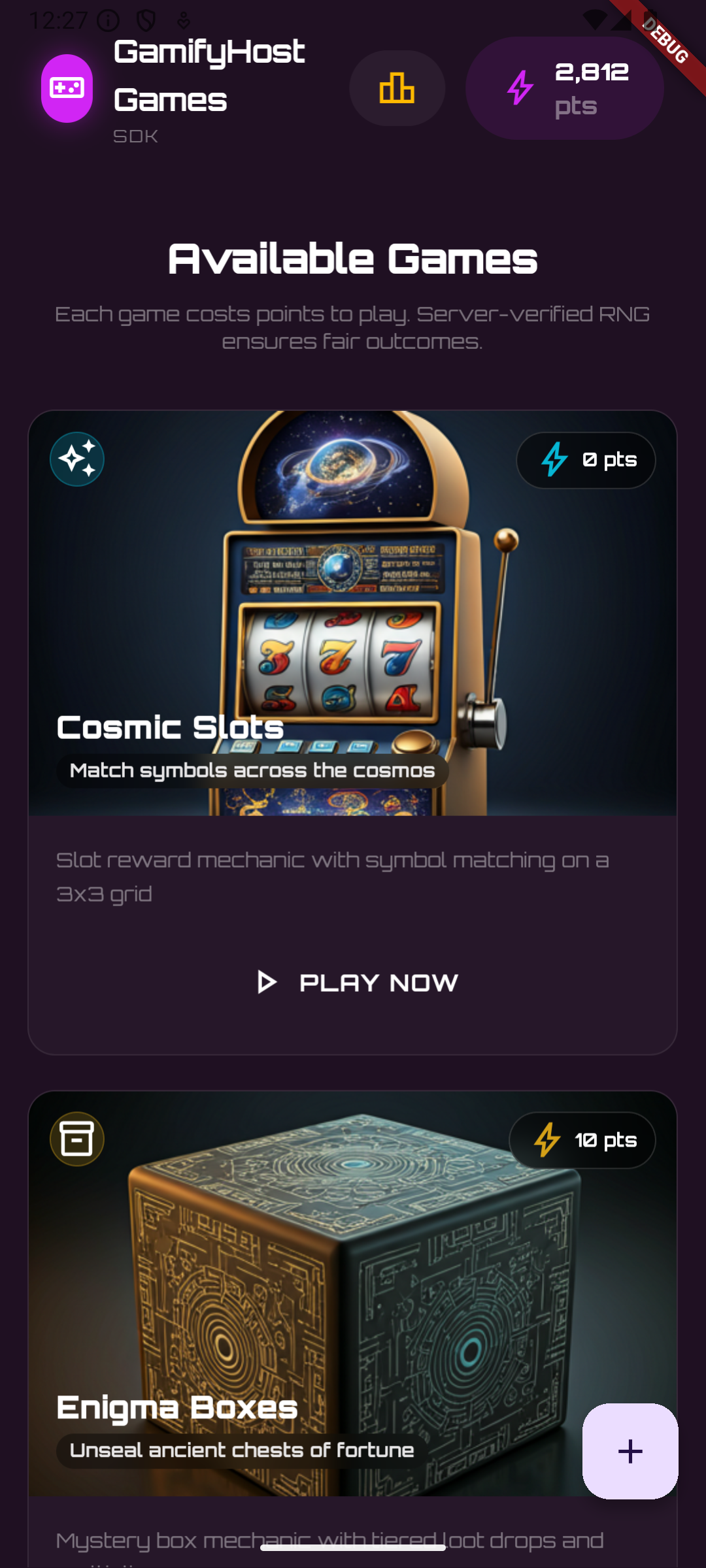
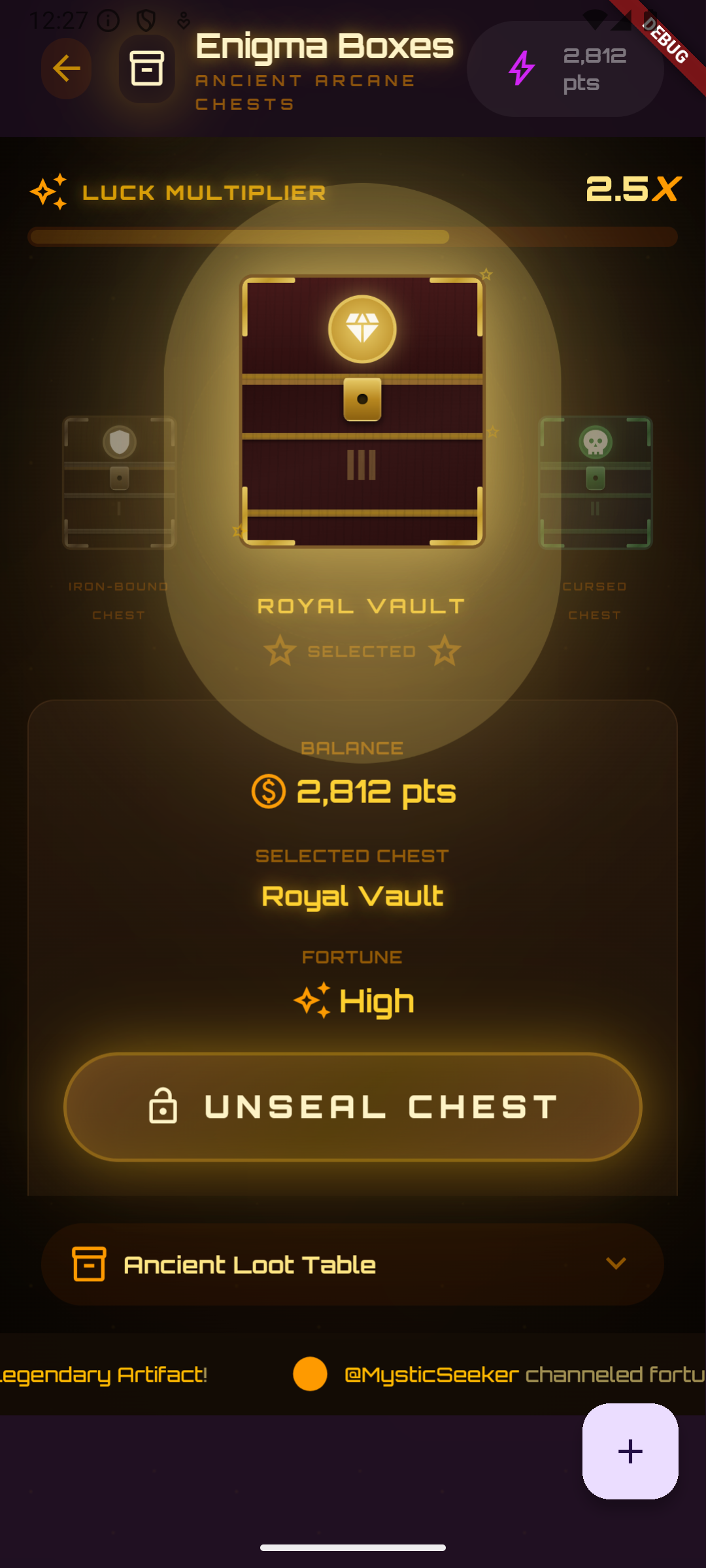
Configuration
Section titled “Configuration”The GamifyHostConfig class accepts the following parameters:
| Parameter | Type | Required | Default | Description |
|---|---|---|---|---|
publicKey | String | Yes | — | Your GamifyHost public API key |
userId | String | Yes | — | The authenticated user’s ID |
apiUrl | String | No | https://api.gamifyhost.com | API base URL |
widgetUrl | String | No | https://cdn.gamifyhost.com/widget.js | Widget script URL |
initialBalance | int | No | 0 | Balance to show before API responds |
const config = GamifyHostConfig( publicKey: 'pk_live_abc123', userId: 'user_12345', apiUrl: 'https://api.gamifyhost.com', widgetUrl: 'https://cdn.gamifyhost.com/widget.js', initialBalance: 5000,);Updating Config
Section titled “Updating Config”Use copyWith to create a modified config:
final updatedConfig = config.copyWith( userId: 'user_67890', initialBalance: 3000,);Widget Properties
Section titled “Widget Properties”The GamifyHostWidget accepts these properties:
| Property | Type | Default | Description |
|---|---|---|---|
config | GamifyHostConfig | Required | Widget configuration |
controller | GamifyHostController? | null | Optional controller for programmatic access |
onReady | VoidCallback? | null | Called when widget finishes loading |
onError | Function(String)? | null | Called on WebView loading errors |
backgroundColor | Color | Color(0xFF1F1022) | Background while loading |
showLoadingIndicator | bool | true | Show spinner while loading |
loadingIndicatorColor | Color? | Theme primary | Spinner color |
Controller
Section titled “Controller”Use GamifyHostController for programmatic control:
class GameScreen extends StatefulWidget {  const GameScreen({super.key});
  @override  State<GameScreen> createState() => _GameScreenState();}
class _GameScreenState extends State<GameScreen> {  final _controller = GamifyHostController();
  @override  void dispose() {    _controller.dispose();    super.dispose();  }
  @override  Widget build(BuildContext context) {    return Scaffold(      appBar: AppBar(        title: const Text('Games'),        actions: [          IconButton(            icon: const Icon(Icons.refresh),            onPressed: () => _controller.reload(),          ),        ],      ),      body: GamifyHostWidget(        config: const GamifyHostConfig(          publicKey: 'pk_live_abc123',          userId: 'user_12345',        ),        controller: _controller,        onReady: () => debugPrint('Widget loaded'),        onError: (err) => debugPrint('Error: $err'),      ),    );  }}
Controller Methods
Section titled “Controller Methods”| Method | Description |
|---|---|
reload() | Reload the widget with the current config |
reloadWithConfig(config) | Reload with a new GamifyHostConfig |
runJavaScript(js) | Execute arbitrary JS inside the WebView |
isReady | ValueNotifier<bool> indicating load state |
dispose() | Clean up resources |
Listening to Ready State
Section titled “Listening to Ready State”_controller.isReady.addListener(() { if (_controller.isReady.value) { debugPrint('Widget is ready'); }});Switching Users
Section titled “Switching Users”When the authenticated user changes (e.g. after login), reload with a new config:
_controller.reloadWithConfig( const GamifyHostConfig( publicKey: 'pk_live_abc123', userId: 'new_user_id', initialBalance: 0, ),);Or simply update the config prop — the widget auto-detects config changes and reloads:
GamifyHostWidget( config: GamifyHostConfig( publicKey: 'pk_live_abc123', userId: currentUserId, // Changes trigger reload ),)User Journey Tracking
Section titled “User Journey Tracking”The SDK includes a built-in API client for tracking user behavior, enriching profiles, and retrieving engagement data. All user journey methods are available on GamifyHostApi.
final api = GamifyHostApi( config: const GamifyHostConfig( publicKey: 'pk_live_your_public_key', userId: 'user_12345', ),);Track / Enrich User
Section titled “Track / Enrich User”Create or update a user profile with enrichment data:
final profile = await api.trackUser(  displayName: 'Jane Doe',  email: 'jane@example.com',  country: 'NG',  device: 'android',  source: 'referral',  metadata: {'plan': 'premium'},);
print('Lifecycle: ${profile.lifecycleStage}');print('Engagement: ${profile.engagementScore}');
By default, trackUser uses the userId from your config as the externalId. Pass externalId to override.
Track Events
Section titled “Track Events”Track custom events like page views, purchases, or any user action:
final event = await api.trackEvent( category: 'CUSTOM', eventType: 'purchase', points: 100, metadata: {'productId': 'prod_abc', 'amount': 29.99},);Event categories: CUSTOM, PAGE_VIEW, SESSION
Batch Track Events
Section titled “Batch Track Events”Send multiple events in a single request (max 100):
final count = await api.trackEventsBatch([  TrackEventRequest(    externalId: 'user_12345',    category: 'PAGE_VIEW',    eventType: 'home_screen',  ),  TrackEventRequest(    externalId: 'user_12345',    category: 'CUSTOM',    eventType: 'product_viewed',    metadata: {'productId': 'prod_xyz'},  ),]);
print('Tracked $count events');
Get User Profile
Section titled “Get User Profile”Retrieve a user’s full profile with engagement data and campaign recommendations:
final profile = await api.getUserProfile();
print('Score: ${profile.engagementScore}');print('Stage: ${profile.lifecycleStage}');print('Plays (7d): ${profile.plays7d}');
for (final rec in profile.recommendations) {  print('${rec.name} — ${rec.reason} (${rec.priority})');}
Get User Timeline
Section titled “Get User Timeline”Retrieve a paginated timeline of all events:
final timeline = await api.getUserTimeline(page: 1, limit: 20);
for (final event in timeline.events) {  print('[${event.category}] ${event.eventType} — ${event.occurredAt}');  if (event.points > 0) print('  +${event.points} pts');}
print('Total: ${timeline.total} events');
User Journey Models
Section titled “User Journey Models”| Class | Description |
|---|---|
UserProfile | User profile with lifecycle stage, engagement tier, score, and recommendations |
UserEvent | A single event in the user’s timeline |
UserTimeline | Paginated list of events with total count |
CampaignRecommendation | Recommended campaign with type, reason, and priority |
TrackUserRequest | Request payload for trackUser() |
TrackEventRequest | Request payload for trackEvent() and trackEventsBatch() |
UserOffer | A personalized game offer with type, points, expiry, and claim status |
Personalized Offers
Section titled “Personalized Offers”The SDK provides access to AI-generated personalized game offers for each user.
Get Offers
Section titled “Get Offers”Retrieve active offers for the current user:
final offers = await api.getUserOffers();
for (final offer in offers) {  print('${offer.title} — ${offer.pointsValue} pts');  print('Type: ${offer.offerType}, Expires: ${offer.expiresAt}');}
Claim an Offer
Section titled “Claim an Offer”Claim a specific offer by its ID:
final claimed = await api.claimOffer(offers.first.id);print('Claimed: ${claimed.title} — Status: ${claimed.status}');Cleanup
Section titled “Cleanup”api.dispose();Full Example
Section titled “Full Example”import 'package:flutter/material.dart';import 'package:gamifyhost_games/gamifyhost_games.dart';
void main() { runApp(const MyApp());}
class MyApp extends StatelessWidget { const MyApp({super.key});
@override Widget build(BuildContext context) { return MaterialApp( title: 'My App', theme: ThemeData( colorScheme: ColorScheme.fromSeed( seedColor: const Color(0xFFD125F4), brightness: Brightness.dark, ), ), home: const HomeScreen(), ); }}
class HomeScreen extends StatefulWidget { const HomeScreen({super.key});
@override State<HomeScreen> createState() => _HomeScreenState();}
class _HomeScreenState extends State<HomeScreen> { final _controller = GamifyHostController(); late final GamifyHostApi _api; List<UserOffer> _offers = [];
static const _config = GamifyHostConfig( publicKey: 'pk_live_your_public_key', userId: 'user_12345', apiUrl: 'https://api.gamifyhost.com', initialBalance: 5000, );
@override void initState() { super.initState(); _api = GamifyHostApi(config: _config); _trackAndLoadOffers(); }
Future<void> _trackAndLoadOffers() async { // Track / enrich the user on app launch await _api.trackUser( displayName: 'Jane Doe', email: 'jane@example.com', device: 'android', source: 'organic', );
// Track a page view event await _api.trackEvent( category: 'PAGE_VIEW', eventType: 'home_screen', );
// Load personalized offers final offers = await _api.getUserOffers(); setState(() => _offers = offers); }
Future<void> _claimOffer(UserOffer offer) async { final claimed = await _api.claimOffer(offer.id); debugPrint('Claimed: ${claimed.title} — ${claimed.status}');
// Refresh the offers list final updated = await _api.getUserOffers(); setState(() => _offers = updated); }
@override void dispose() { _controller.dispose(); _api.dispose(); super.dispose(); }
@override Widget build(BuildContext context) { return Scaffold( appBar: AppBar( title: const Text('GamifyHost Games'), actions: [ IconButton( icon: const Icon(Icons.refresh), onPressed: () => _controller.reload(), ), ], ), body: Column( children: [ // Personalized offers banner if (_offers.isNotEmpty) SizedBox( height: 100, child: ListView.builder( scrollDirection: Axis.horizontal, padding: const EdgeInsets.all(8), itemCount: _offers.length, itemBuilder: (context, index) { final offer = _offers[index]; return Card( margin: const EdgeInsets.only(right: 8), child: InkWell( onTap: () => _claimOffer(offer), child: Padding( padding: const EdgeInsets.all(12), child: Column( crossAxisAlignment: CrossAxisAlignment.start, children: [ Text(offer.title, style: const TextStyle( fontWeight: FontWeight.bold)), Text('${offer.pointsValue} pts', style: TextStyle( color: Theme.of(context).colorScheme.primary)), const Spacer(), const Text('Tap to claim', style: TextStyle(fontSize: 10)), ], ), ), ), ); }, ), ),
// Game widget Expanded( child: GamifyHostWidget( config: _config, controller: _controller, backgroundColor: const Color(0xFF1F1022), showLoadingIndicator: true, onReady: () => debugPrint('GamifyHost widget loaded'), onError: (error) => debugPrint('GamifyHost error: $error'), ), ), ], ), ); }}